Blog entry 8/15/13
Final Project
So me and Sparks teamed up for our project. After some soul searching and the H bridge lab, we thought to make a drone that serves people drinks. Our pitch was R2D2 but with beer. The inspiration behind the whole thing was really to serve as a proof of concept for something bigger. In the spirit of my midterm project, I wanted to show that "interaction" didn't have to be synonymous with "manual". While there is definitely a certain aesthetic pleasure that is derived from interacting with a new contraption, we wanted to express that practical utility can come from being judicious with automation during the design phase.
This isn't about beer. This is about empowering an individual by abstracting away the tedious and mundane aspects of daily life. At risk of sounding like a token grad student and using the word "meta" like it's going out of style, this is about innovating at scale. To me, this is ultimately about tools that build tools.
Before beer, we were brainstorming other variations on this theme like a builder bot that would let the user construct something like a bicycle frame or a wooden loft for homes like the endlessly subdividing warehouse spaces in Brooklyn. Given the time and resources we had, we decided that beer bot would be the most effective way to put this idea out in the world and prove that such a thing can exist.
After more than a couple sleepless nights, double espressos, and burnt LEDs, we have nearly finished our system. Instead of a bleep-bloop-blopping baby stroller/trash can a la R2D2, we decided to make a Mars rover-style drone and a cooler base station that automatically dispenses a beverage when the rover is docked. This was largely driven by the load capacity of the motors in the RC car and relative torque of other motors we came across. For the rover, we used the frame, wheels, and motors of a $5 RC car from Walgreens, a pencil box to house the components, two Unos, a motor shield, two ultrasonic sensors, and a servo. For the base station, we cut a hole in the bottom, put a hinge on the cutout, built a dock for the rover, and threw in a couple servos along with some pulley-operated levers to manage the flow of cans.
Here are some pics of the development phase. We really tried to push ourselves by looking to implement more sophisticated input mechanisms like face recognition using OpenCV in Python on a Raspberry Pi, hacking an infrared thermometer to detect body heat, and infrared LEDs to communicate direction from a handheld remote. However, the devil unsurprisingly ended up in the details. Figuring out things like how to keep wires from getting pulled out every time the servo rotated or what kind of voltage the motors could handle in order to carry the payload wound up taking up more of our time than we might have preferred. We look forward to pursuing these more advanced inputs in the future but for the time being, I think we got ourselves a pretty awesome party Roomba and a tailgating accessory with an escape hatch.


Here's the code for the rover at the time of this blog post. There's still a couple tweaks left but this should give you a general idea of where we're going. At a high level, there is a switch in the cooler that closes when the rover is docked, proximity logic that backs the rover out of the dock and moves it around the room, and a switch in the beer hitch that tells the rover to return to base when a beer has been removed. As of now, "return to base" means "blink LED so a user can turn it around and point it in the right direction like a Tweenbot".
Beerbot Brain
*/
//Software Serial vars
#include <SoftwareSerial.h>
SoftwareSerial mySerial(0, 10);//rx tx
//Servo vars
#include <Servo.h>
Servo myservo;
int pos = 35;
int i = 0;
long loopit = 0;
//Ultrasonic vars
#define BackTrigPin 2
#define BackEchoPin 3
#define FrontTrigPin 4
#define FrontEchoPin 5
long FrontDuration,
BackDuration,
FrontDistance,
BackDistance,
LastFront,
LastBack,
PreFrontDistance,
PreBackDistance;
//Switch vars
#define BeerPin 7
int state = HIGH; // the current state of the output pin
int reading; // the current reading from the input pin
int previous = HIGH; // the previous reading from the input pin
long time = 0; // the last time the output pin was toggled
long debounce = 200;
//Setup
void setup() {
//Sensors
pinMode(BackTrigPin, OUTPUT);
pinMode(BackEchoPin, INPUT);
pinMode(FrontTrigPin, OUTPUT);
pinMode(FrontEchoPin, INPUT);
//Servo
myservo.attach(13);
//Switch
pinMode(BeerPin, INPUT);
//Comm
mySerial.begin(9600);
Serial.begin (4800);
delay(3000);
}
//Loop
void loop() {
Serial.println("Loop " + loopit);
if(loopit == 0) {
exitcooler();
}
// while(FrontDistance > 0) {
wander();
checkbeer();
wall();
checkbeer();
loopit++;
// }
}
//Front Ultrasonic Sensor Function
//Uses debounce and a smoothing method that stores previous value.
//This previous value is used in a conditional to prevent any unwelcome data spikes.
void frontsensor() {
Serial.println("Front Sensor");
digitalWrite(FrontTrigPin, LOW); // Added this line
delayMicroseconds(2); // Added this line
digitalWrite(FrontTrigPin, HIGH);
delayMicroseconds(10); // Added this line
digitalWrite(FrontTrigPin, LOW);
FrontDuration = pulseIn(FrontEchoPin, HIGH);
PreFrontDistance = (FrontDuration/2) / 29.1;
if(loopit !=0) {
LastFront = FrontDistance;
}
if(loopit == 0) {
LastFront = PreFrontDistance;
}
if(LastFront-PreFrontDistance > 10 || LastFront-PreFrontDistance < -10) {
FrontDistance = LastFront;
}
if(LastFront-PreFrontDistance > 10 || LastFront-PreFrontDistance < -10) {
FrontDistance = PreFrontDistance;
//stop();
//lookstraight();
}
Serial.print(FrontDistance);
Serial.println(" cm - Front sensor");
delay(200);
}
//Back Ultrasonic Sensor Function
//Same as front sensor
void backsensor() {
Serial.println("Back Sensor");
digitalWrite(BackTrigPin, LOW); // Added this line
delayMicroseconds(2); // Added this line
digitalWrite(BackTrigPin, HIGH);
delayMicroseconds(10); // Added this line
digitalWrite(BackTrigPin, LOW);
BackDuration = pulseIn(BackEchoPin, HIGH);
PreBackDistance = (BackDuration/2) / 29.1;
if(loopit !=0) {
LastBack = BackDistance;
}
if(loopit == 0) {
LastBack = PreBackDistance;
}
if(LastBack-PreBackDistance > 10 || LastBack-PreBackDistance < -10) {
BackDistance = LastBack;
}
if(LastBack-PreBackDistance > 10 || LastBack-PreBackDistance < -10) {
BackDistance = PreBackDistance;
}
// Serial.print(BackDistance);
// Serial.println(" cm - Back sensor");
delay(200);
}
//Forward Function
//Passes a byte to the Ardy/Seeed motor shield that tells it to spin the back wheels forward
void goforward() {
Serial.println("Go Forward");
mySerial.print("^");
Serial.println("^");
}
//Forward Function
//Passes a byte to the Ardy/Seeed motor shield that tells it to spin the back wheels backward
void goback() {
Serial.println("Go Back");
mySerial.print("R");
Serial.println("R");
}
//Forward Right Function
//Passes a byte to the Ardy/Seeed motor shield that tells it to spin the back wheels forward and turn the front wheels to the right
void goforwardright() {
Serial.println("Go Forward Right");
mySerial.print("1");
Serial.println("1");
}
//Forward Left Function
//Passes a byte to the Ardy/Seeed motor shield that tells it to spin the back wheels forward and turn the front wheels to the left
void goforwardleft() {
Serial.println("Go Forward Left");
mySerial.print("2");
Serial.println("2");
}
//Back Right Function
//Passes a byte to the Ardy/Seeed motor shield that tells it to spin the back wheels backward and turn the front wheels to the right
void gobackright() {
Serial.println("Go Back Right");
mySerial.print("3");
Serial.println("3");
}
//Back Left Function
//Passes a byte to the Ardy/Seeed motor shield that tells it to spin the back wheels backward and turn the front wheels to the left
void gobackleft() {
Serial.println("Go Back Left");
mySerial.print("4");
Serial.println("4");
}
//Stop Function
//Tells the Ardy motorshield to stop the wheels
void stop() {
Serial.println("Stop");
mySerial.print("S");
Serial.println("S");
}
void lookstraight() {
Serial.println("Look Straight");
pos = 35;
myservo.write(pos);
frontsensor();
backsensor();
}
void lookslightleft() {
Serial.println("Look Slight Left");
pos = 35+30;
myservo.write(pos);
frontsensor();
backsensor();
}
void lookslightright() {
Serial.println("Look Slight Right");
pos = 35-30;
myservo.write(pos);
frontsensor();
backsensor();
}
void lookperp() {
Serial.println("Look Perp");
pos = 35+90;
myservo.write(pos);
debounce;
frontsensor();
backsensor();
}
void exitcooler() {
Serial.println("Exit Cooler");
lookstraight();
while(FrontDistance < 60 && FrontDistance != 0) {
goback();
}
lookperp();
if(FrontDistance > BackDistance) {
gobackright();
}
if(BackDistance <= FrontDistance) {
gobackleft();
}
}
void wander() {
Serial.println("Wander");
while(FrontDistance > 60) {
lookstraight();
goforward();
}
}
void wall() {
Serial.println("Wall");
stop();
lookstraight();
if(FrontDistance < 60) {
lookslightright();
if(FrontDistance < 60) {
lookslightleft();
if(FrontDistance < 60) {
lookperp();
}
}
}
}
void checkbeer() {
Serial.println("Check Beer");
reading = digitalRead(BeerPin);
time = millis();
previous = reading;
debounce;
reading = digitalRead(BeerPin);
if (reading == HIGH && previous == HIGH && millis() - time > debounce) {
time = millis();
}
if (reading == LOW && previous == LOW && millis() - time > debounce) {
time = millis();
returntocooler();
}
}
void returntocooler() {
Serial.println("Return to Cooler");
}
/*
Beerbot Legs
*/#include <SoftwareSerial.h>
SoftwareSerial mySerial(7, 1);//rx tx
int pinI1=8;//define I1 interface
int pinI2=11;//define I2 interface
int speedpinA=9;//enable motor A
int pinI3=12;//define I3 interface
int pinI4=13;//define I4 interface
int speedpinB=10;//enable motor B
int motorspeed =1023;//define the motorspeed of motor
void setup()
{
mySerial.begin(9600);
Serial.begin(4800);
pinMode(pinI1,OUTPUT);
pinMode(pinI2,OUTPUT);
pinMode(speedpinA,OUTPUT);
pinMode(pinI3,OUTPUT);
pinMode(pinI4,OUTPUT);
pinMode(speedpinB,OUTPUT);
}
void forward()
{
analogWrite(speedpinA,motorspeed);//input a simulation value to set the speed
analogWrite(speedpinB,motorspeed);
digitalWrite(pinI4,HIGH);//turn DC Motor B move clockwise
digitalWrite(pinI3,LOW);
digitalWrite(pinI2,LOW);//turn DC Motor A move anticlockwise
digitalWrite(pinI1,HIGH);
}
void backward()//
{
analogWrite(speedpinA,motorspeed);//input a simulation value to set the speed
analogWrite(speedpinB,motorspeed);
digitalWrite(pinI4,LOW);//turn DC Motor B move anticlockwise
digitalWrite(pinI3,HIGH);
digitalWrite(pinI2,HIGH);//turn DC Motor A move clockwise
digitalWrite(pinI1,LOW);
}
void left()//
{
analogWrite(speedpinA,motorspeed);//input a simulation value to set the speed
analogWrite(speedpinB,motorspeed);
digitalWrite(pinI4,HIGH);//turn DC Motor B move clockwise
digitalWrite(pinI3,LOW);
digitalWrite(pinI2,HIGH);//turn DC Motor A move clockwise
digitalWrite(pinI1,LOW);
}
void right()//
{
analogWrite(speedpinA,motorspeed);//input a simulation value to set the speed
analogWrite(speedpinB,motorspeed);
digitalWrite(pinI4,LOW);//turn DC Motor B move anticlockwise
digitalWrite(pinI3,HIGH);
digitalWrite(pinI2,LOW);//turn DC Motor A move clockwise
digitalWrite(pinI1,HIGH);
}
void stop()//
{
digitalWrite(speedpinA,LOW);// Unenble the pin, to stop the motor. this should be done to avid damaging the motor.
digitalWrite(speedpinB,LOW);
delay(500);
}
void loop()
{
char msg = char(mySerial.read());
Serial.println(msg);
if(msg == '<') {
left();
}
if(msg == '>') {
right();
}
if(msg == '^') {
forward();
}
if(msg == 'R') {
backward();
}
if(msg == 'S') {
stop();
}
delay(500);
}
Blog entry 7/18/13
Hits & Misses
I feel like I've seen most of the examples from "Physical Computing's Greatest Hits (and misses)" before. The ones I find most compelling fall into two camps. There are those involving computer vision and those that rely on getting the user to really feel something. Like the video mirror or various "as-a-cursor" iterations, computer vision is exciting to me because it relies on advanced data mining techniques for classification. Although data mining has been around for a few years, this seems like the bleeding edge of technology today and is still making headlines in contemporary culture.
One of the more popular computer vision applications out there is called OpenCV. Among a number of other features, this framework can take in sample photos (called a training set) that are tagged with a classification. For instance, if you were looking to train an OpenCV program to recognize cats, your training set would include both photos that do include cats and those which do not. After one teaches OpenCV "this is what cats look like" and "this is what no-cats looks like", it can make an inference on whether a previously unseen image contains a cat.
The other camp I find compelling revolves around getting the user to experience a visceral emotion and perhaps capturing that reaction as an input. A blossoming field of human-computer interaction (HCI) is brain-computer interaction (BCI). This takes the artificial intelligence aspects of computer vision and data mining full circle. BCI can involve EEG machines that scan a user's brainwaves and determine patterns of thought similar to how a webcam can distinguish "face" from "no-face". Here, the object recognized by the program is abstracted from something like a picture of an apple to the electromagnetic energy coming out of our heads as we perceive or meditate on an apple.
I like to think this is especially powerful for emotion because we're feeling animals before thinking ones. Logic can sometimes seem like a tool used by emotion so that emotion can get what it desires. There are definite use cases in human psychology where logic is practically short circuited. Lets say you see a snake. You have parallel circuits in the brain that can trigger areas associated with negative emotions like pain or anger before you can even consciously recognize that it's a snake you're looking at. It's why people involuntarily yank their hand away from a hot stove. Way back when, the cavemen who had to sit around and think about this kind of stuff before acting likely don't have many modern day descendants left. Nature has had time to set up systems much more clever and brilliant than any engineer or artist could probably imagine. I think we would be well-served to exploit the nuances of these systems to their fullest potential.
Blog entry 7/16/13
Object Observation - Soda Fountain
Behold the lowly soda fountain. An unsophisticated piece of technology that serves to get syrup and carbonated water from a restaurant kitchen to a user's cup. The interface is straightforward. Each type of beverage usually gets its own label, button, and spout. The exceptions are the big gap and lever in the middle for ice and typically water making a brief appearance in a supporting role as a secondary button under lemonade or Sprite.
A nice feature one might see on these machines is a lever protruding alongside each spout directly under the top of the machine. The alternative to this design is typically buttons labelled "push" by the beverage label. What makes the lever nice is that it makes one-handed operation easier. This way, the user can reach for napkins or a straw while filling his or her cup.
It doesn't have any smarts in the sense that it can't tell you if the root beer doesn't taste right. It can't flow faster or slower depending how hard you press the lever. It doesn't know to stop the flow when the cup is full. Despite these shortcomings, the contraption persists. Its an intuitive and popular dispenser of a ubiquitous good that is as fancy as it needs to be, in light of durability and affordability.
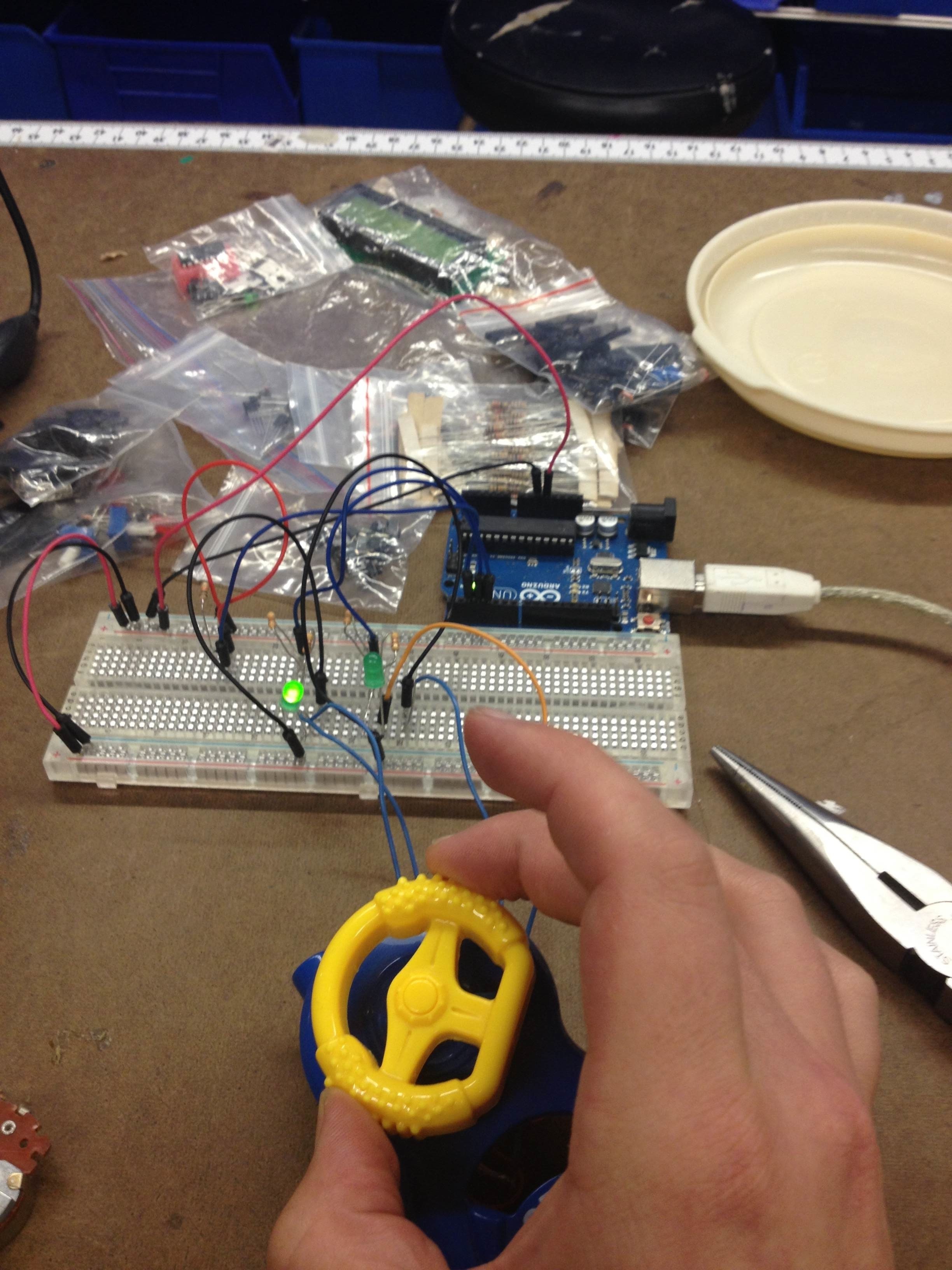
*Nice pics from switch lab*
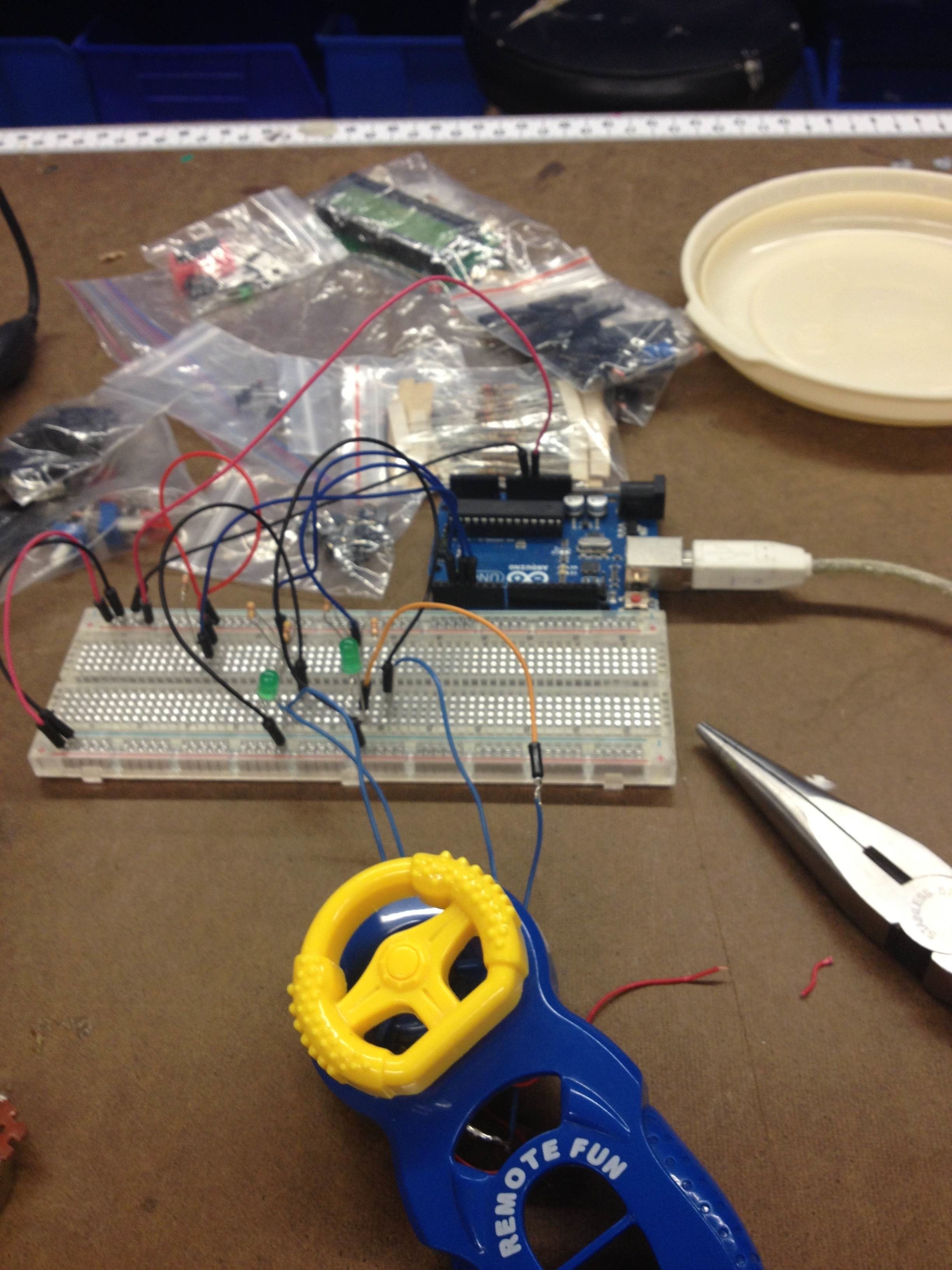
Found a nifty toy car remote in the junk bin. Soldered the leads on either end of the steering wheel to close a circuit for one of two LEDs.

Blog entry 7/11/13
What is good interaction design?
What is physical interaction? What makes good interaction design?
A well-designed product in our day and age is a lot like art or poetry or falling in love. It's tough to put into words but you know it when you see it.
Looking at the shifts in industrial design from the 1960's through the 1980's, mass produced goods started to incorporate an illusion of personality. This could be as humble as a small bird on the end of a tea kettle spout or as infinitely customizable the personal computer. Regardless of the product, a good that had the power to make you feel would likely win out in what was becoming an increasingly crowded marketplace.
"Good" interaction is a pretty loaded statement, in my opinion. Sure, the aesthetics could be subtle and beutiful enough for you to not even be aware of a user interface, but technology can only be as good or bad as the person using it. If you have a tea kettle that whistles from a little plastic bird, that's great. You designed something and it performed to specifications. But what value does it really bring to society?
I think a successful product wins by making up for a debt created when brought into this world. It needs to pay us back for separating us from one another more than we were already. Although you might typically hear folks lamenting these days how the dating scene has changed since the advent of SMS or how their parents just don't "get" social media, this seems to be something that technology has been doing since the dawn of time. If the invention of language was meant to bring us all together, why don't we all share one? Why can the same blade I use to til the soil also be used to harm my brother?
Good product design solves for "why" before all else.